The Delft3D Flexible Mesh Processing Tool offers two key functions to enhance the use and visualization of modelling results from Delft3D FM:
-
Conversion of modelling results from Delft3D FM, which are in netCDF format using the UGRID convention, into a netCDF format that adheres to the Climate & Forecast (CF) Metadata Conventions. The CF conversion enables direct support and visualisation for the resulting data in various CF compliant software applications, particularly ArcGIS Pro.
-
Uploading the converted netCDF file into ArcGIS Online / ArcGIS Server as an Imagery Layer, allowing users to easily visualise the modelling results via a web browser.
Create a conda virtual environment of Python 3.9:
conda create -n D3DFM python=3.9
Set up the environment with environment.yml:
conda env update --file environment.yml --prune
 |
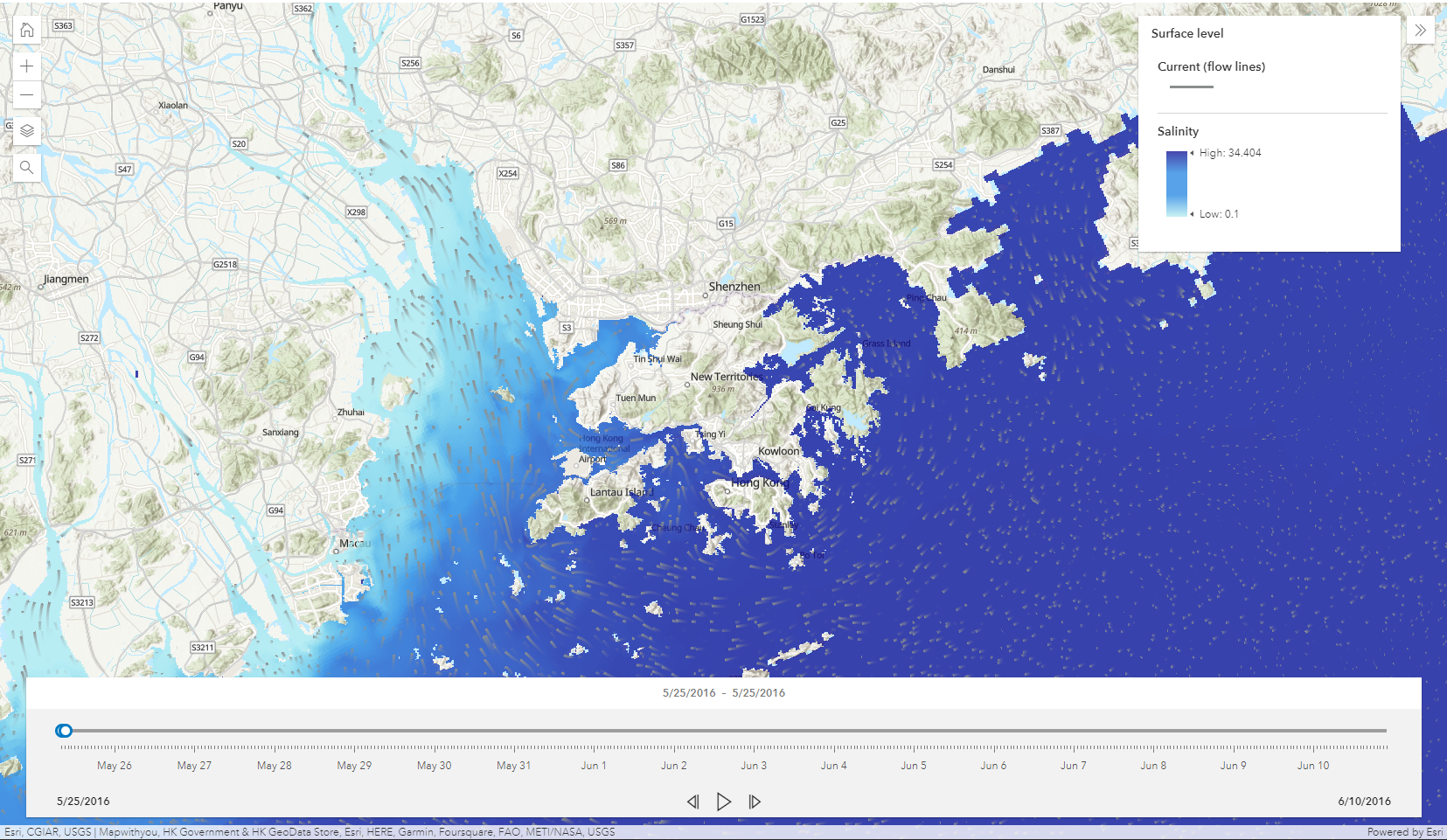 |
| Rasterized D3DFM NetCDF in ArcGIS Pro | Rasterized D3DFM NetCDF in a web browser. |
The CLI (cli.py) provides four subcommands:
| Subcommand | Description |
|---|---|
rasterize |
Rasterize a NetCDF file using parameters from a plain text file. |
rasterize2 |
Rasterize a NetCDF file using parameters structured in a JSON configuration file. |
uploadagol |
Upload a rasterized NetCDF to ArcGIS Online. |
vectorize |
Generate a vector field layer from an uploaded ArcGIS Online imagery item. |
python cli.py rasterize INPUTFILE1.TXT
Rasterizes (i.e., converts from UGRID to CF-compliant) a Delft3D FM NetCDF file using parameters provided in INPUTFILE1.TXT.
| Line | Parameter | Description |
|---|---|---|
| 1 | Input NetCDF path | Path to the original Delft3D FM NetCDF |
| 2 | Output NetCDF path | Destination for rasterized CF-compliant file |
| 3 | Variables | Comma-separated variable names |
| 4 | Time range | Either index-based (start,end,step) or datetime-based (YYYY-MM-DDTHH:mm:ss,YYYY-MM-DDTHH:mm:ss,step) |
| 5 | Layers | Comma-separated layer indices |
| 6 | Bounding box | xmin, ymin, xmax, ymax |
| 7 | ncellx | Number of grid cells in X direction |
| 8 | ncelly | Number of grid cells in Y direction |
| 9 | Data types | Per-variable data packing type (int8, int16, int32, int64, or none) |
| 10 | Time shift | Offset in seconds |
Each line should be separated by a newline character. A sample input file is as follows:
D:\temp\HK-FM_merged_mapSep.nc
D:\temp\HK-FM_merged_mapSep_raster4.nc
mesh2d_sa1
2023-06-01T00:00:00, 2023-06-30T00:00:01, 1
0, 10, 19
113.213111, 21.917770, 114.627601, 23.145613
800
800
int8
-28800
D:\temp\HK-FMWAQ_merged_map.nc
D:\temp\HK-FMWAQ_merged_map_4var1dtype.nc
mesh2d_EColi,mesh2d_sa1,mesh2d_tem1,mesh2d_OXY
2013-11-08T00:00:00, 2014-11-01T00:00:00, 1
0, 10, 19
113.213111, 21.917770, 114.627601, 23.145613
800
800
int8
0
D:\temp\HK-FMWAQ_merged_map.nc
D:\temp\HK-FMWAQ_merged_map_4var4dtype.nc
mesh2d_EColi,mesh2d_sa1,mesh2d_tem1,mesh2d_OXY
2013-11-08T00:00:00, 2014-11-01T00:00:00, 1
0, 10, 19
113.213111, 21.917770, 114.627601, 23.145613
800
800
none, int8, int8, int8
0
python cli.py rasterize2 INPUTFILE1.JSON
Rasterizes a Delft3D FM NetCDF file using a JSON configuration file. This is the preferred and more flexible approach compared to rasterize.
rasterize2 reads structured JSON input that defines spatial, temporal, and packing configurations for one or multiple variables. It supports:
- Datetime-based slicing of time range (
time_cfg) - Temporal downsampling (
downscale_hours) - Vertical interpolation for 3‑D data (
ncellz) - Independent variable data type packing (
dtype) - Automatic CF metadata preservation
{
  "input_nc": "D:/temp/HK-FMWAQ_merged_map.nc",
  "output_nc": "D:/temp/HK-FMWAQ_rasterized_CF.nc",
  "bbox": [113.213111, 21.917770, 114.627601, 23.145613],
  "ncellx": 800,
  "ncelly": 800,
  "ncellz": 20,
  "variables": [
    {"name": "mesh2d_EColi", "dtype": "None"},
    {"name": "mesh2d_sa1", "dtype": "int8"},
    {"name": "mesh2d_tem1", "dtype": "int8"},
    {"name": "mesh2d_OXY", "dtype": "int8"}
  ]
}| Key | Type | Required | Description |
|---|---|---|---|
input_nc |
string | ✅ | Path to the source D3D FM NetCDF file |
output_nc |
string | ✅ | Path to the destination rasterized NetCDF file |
bbox |
list[float] | ✅ | [xmin, ymin, xmax, ymax] bounding box for target grid |
ncellx, ncelly |
int | ✅ | Number of output grid cells in X and Y |
time_cfg |
list[str] | * | [start, end] ISO 8601 datetimes to define temporal range |
downscale_hours |
int | * | Temporal sampling step (approximate hours per frame) |
timeshift |
int | * | Offset (in seconds) to adjust CF time coordinate |
ncellz |
int | * | Enables vertical interpolation (defines number of depth layers) |
layers |
list[int] | * | Specific model layers to include (if ncellz not provided) |
variables |
list[dict] | ✅ | Variable definitions (see below) |
Each element in variables includes:
| Key | Type | Required | Description |
|---|---|---|---|
name |
string | ✅ | Variable in the source dataset |
dtype |
string | * | Output storage type (none, int8, int16, int32, int64) |
- CF-compliant NetCDF4 file, rasterized on a regular lat–lon grid.
- Packed according to specified data types.
- Optionally includes vertically interpolated 3‑D fields.
Under the hood, rasterize2() performs:
- Opens and parses D3DFM NetCDF using xarray.
- Reads and interprets JSON fields into an execution plan.
- Uses
dataset.d3dfm.rasterize_variables()to interpolate unstructured data. - Applies automatic land masking and optional vertical interpolation.
- Adjusts CF time metadata based on
timeshift. - Exports data via
to_packed_netcdf(), preserving compression and encoding.
python cli.py uploadagol INPUTFILE2.TXT
python cli.py uploadagol INPUTFILE2.TXT --vectorize
Uploads rasterized NetCDF data to ArcGIS Online (as a hosted imagery layer).
Using --vectorize will also generate a vector field service.
| Line | Description |
|---|---|
| 1 | AGOL username |
| 2 | AGOL password |
| 3 | Input NetCDF path |
| 4 | Output imagery layer name |
| 5 | X-component variable name (if vectorized) |
| 6 | Y-component variable name (if vectorized) |
| 7 | Output vector layer name (if vectorized) |
A sample input file is as follows:
username
password
D:\temp\HK-FM_merged_map_ucxucy_dry1.nc
Test_Dry_ucxucy
mesh2d_ucx
mesh2d_ucy
Test_Dry_VecFie
python cli.py vectorize INPUTFILE3.TXT
Converts an uploaded ArcGIS imagery item into an interactive vector field.
| Line | Description |
|---|---|
| 1 | AGOL username |
| 2 | AGOL password |
| 3 | Item ID |
| 4 | X-component variable |
| 5 | Y-component variable |
| 6 | Output vector service name |
A sample input file is as follows:
username
password
779aaa999bbbcccddd666eeefff333ff
mesh2d_ucx
mesh2d_ucy
Test_Dry_VecFie